I always got stuck on the third chord, so I built a tool for it
I can play plenty of chords but never knew which one comes next. So I built WhatsTheNextChord: pick the chord you're on, get a few that fit, shown as guitar shapes.
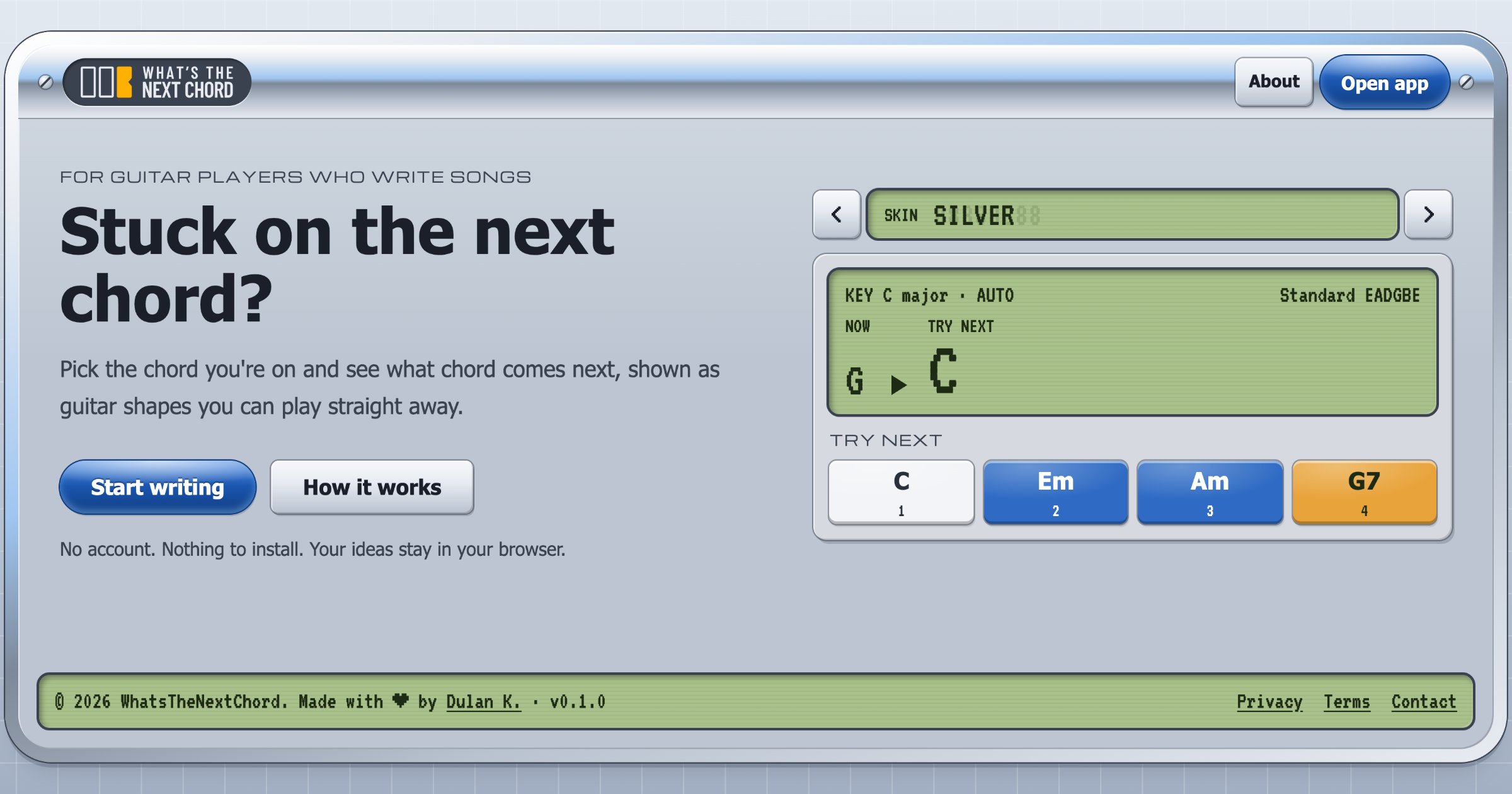
I've been playing guitar for years, and I can grab a lot of chords without thinking: open, barre, power chords, the drop-tuned shapes half my playlist is built on. I listen to music basically all day, mostly metal and rock. So you'd think writing a progression of my own would be easy.
It isn't. The first chord is easy (it's wherever my hand lands). The second one usually turns up from somewhere. And then I'm stuck on the third, every single time, cycling through the same handful of shapes until the idea goes stale and I put the guitar down.
The problem is that I never learned music theory. My hands know the chords and my ears know when something sounds right, but there's nothing in between to tell me what's worth trying next. It's a bit like knowing a lot of words in a language without knowing its grammar: you can say plenty, you just can't build a sentence.
What I wanted was something that would just tell me: here are a few chords that tend to work after this one, and here's how to play them. I couldn't find one that worked the way I wanted, so I built WhatsTheNextChord.
The tools I found weren't built for a guitar
Chord suggestion tools already exist. Hooktheory's Hookpad has a "Magic" palette that ranks next chords by how often they show up in real songs, and Scaler and ChordChord do their own versions of it. But they lean theory-first (scale degrees, piano keys), or they generate a whole progression for you, and none of them cared which tuning I was in or what the chord looks like on a fretboard.
What I wanted was smaller:
- Pick the chord you're on and get three to five options. No more, because staring at fifteen options is the same problem with extra steps.
- Show guitar shapes first, and theory only when I ask for it.
- Get from "I'm stuck" to "I'm playing again" in seconds, with no account and no setup.
What it does
You pick the chord you're on and get three to five chords that tend to follow it, each with shapes you can play straight away, an easy, medium or hard rating, and a one-line reason in plain English. Start on G, for example, and it suggests C, Em, D, Am and Bm. Add the one that sounds right, and the next round follows the key your progression implies.
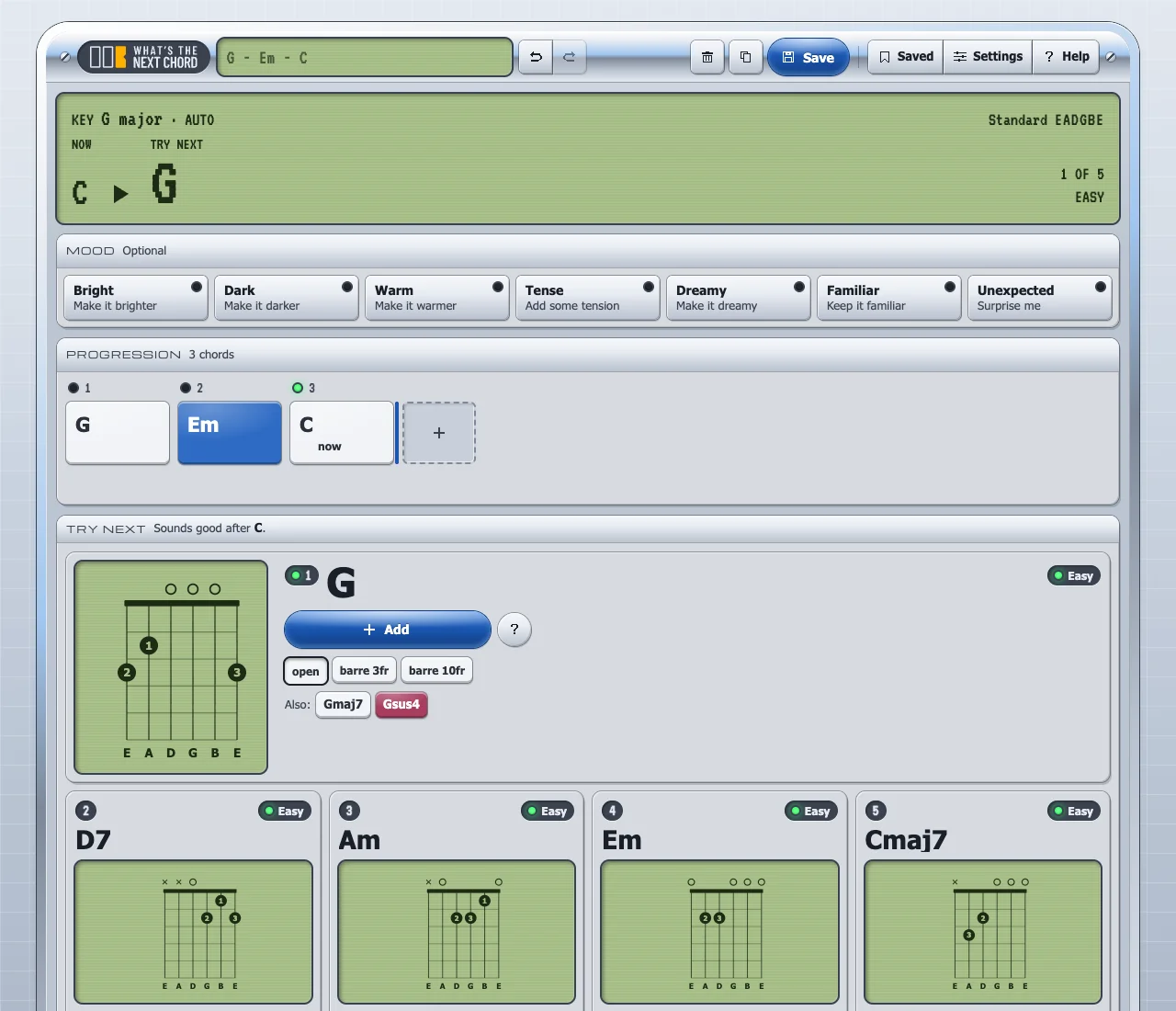
Moods (Bright, Dark, Warm, Tense, Dreamy, Familiar, Unexpected) reorder the suggestions without hiding any chords. There are eight genre presets, and yes, one of them is Metal rhythm (I'm not sure what you expected). It handles Standard, Drop D and Drop C tuning, each with its own shapes, and your progression autosaves in the browser.
No AI, on purpose
Every candidate chord gets a score, and the score is a weighted sum of five things: how naturally it follows in the key (40%), how easy the shape is to play (25%), how well it matches the mood (20%), how smoothly the notes move from one chord to the next (10%), and a little variety so you don't get the same three chords forever (5%). The key is inferred from what you've played so far, and your first chord counts as "home" until there's more evidence.
There's no machine learning in it, and the same chords always give the same suggestions. In 2026, "does it use AI?" is the first question anyone asks about a new tool, and here the answer is no, on purpose: when suggestions are predictable, you can learn from them. Play the same G-to-Em move enough times and you start to hear why it works (theory, sneaking in through the back door).
Three rules came from playing with it, not from a textbook. Plain chords beat their fancier extensions by default (nobody stuck on chord three wants a Cmaj7 when a C would do). There's one suggestion per root note, otherwise C, Cmaj7 and Csus2 eat three of your four slots. And power chords only show up after a power chord, because an A5 in the middle of a campfire song is just noise.
Checking my guesses against real songs
The first version's chord-to-chord tables were hand-written, which is a polite way of saying educated guesses. So I checked them against the Rock Corpus: 200 songs from Rolling Stone's 500 Greatest, analysed chord by chord by two music theorists, Trevor de Clercq and David Temperley.
A few things jumped out. After a IV chord, songs go back home to I 58% of the time, basically the same as after a V (57%), even though every theory explainer I'd skimmed treats V→I as the main event. And the embarrassing one: after a bVII, songs land on I almost half the time (48%), and my tables gave that move no bonus at all. bVII→I is about as rock as a chord change gets, I listen to rock all day, and my own engine was ignoring it.
These days the default tables and the genre presets come from a much bigger pool, around 680,000 songs pulled from Ultimate Guitar tabs, crunched offline and shipped as plain data. The Rock Corpus stays as the sanity check. (It's mostly songs from the '50s to the '70s, so I wouldn't trust it alone for anything heavier.)
I also read ChordRipple, a 2016 chord recommender tested with music students. They complained about too many options, which made me feel better about the three-to-five cap, and asked for a way to say "I'm trying to end here" versus "keep it going". I'll come back to that one.
The Drop D problem
My first take on Drop D was lazy: copy the standard-tuning shapes and switch off the low string. The suggestions were fine. The shapes weren't.
Csus2 would come up with the open shape and a 3rd-fret barre, but not the one a Drop D player actually reaches for: 10 10 12 12 x x, the open 0 0 2 2 x x shape moved up the neck. And every barre chord had its low string muted, which kind of defeats the point of tuning it down in the first place.
So I gave Drop D its own low-root shapes (sus2, sus4, six-string major and minor with the bottom three strings on one fret, etc.), written for the tuning instead of borrowed from standard. Drop C gets them by shifting everything down a whole step.
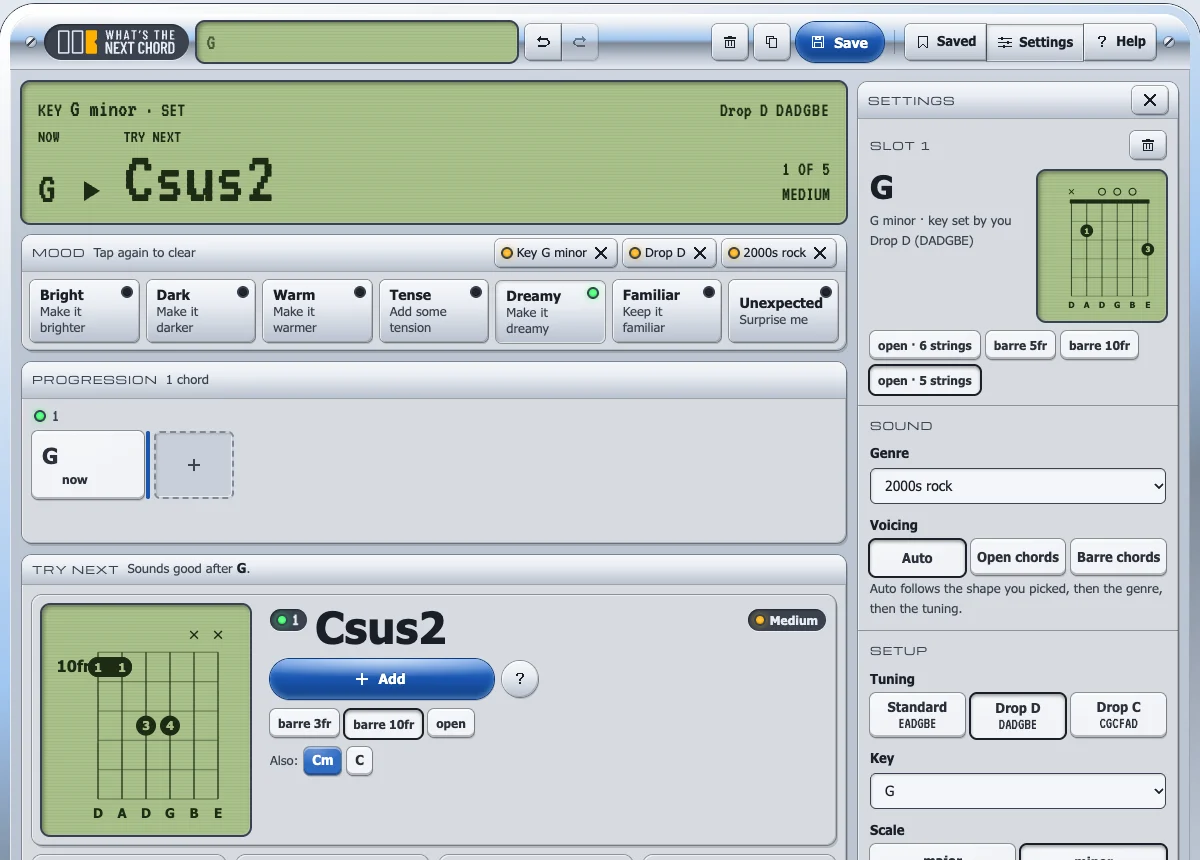
That's the whole guitar-first argument in one bug. A table can tell you a chord fits, but if the shape isn't the one your hand expects, the suggestion is useless.
Making it look like a gadget from 2003
The first UI was warm paper and sand colours, and it felt like a notes app. The second was a dark DAW-style studio, more familiar but kinda generic. The third one stuck: a Y2K hardware device with liquid-chrome bezels, glossy gel buttons, LCD readouts and LEDs, inspired by the Suzuki QChord and Winamp-era skins. That one's pure nostalgia: I'm a '90s kid, and this is what cool tech looked like when I was growing up.
One rule I kept through all three: no sound. No play buttons, no fake transport. You already have a guitar in your hands.
Shipping it
It's a Nuxt 4 app, with the music logic in a separate plain TypeScript package that knows nothing about Vue or the browser, so a desktop or mobile build later won't need a rewrite.
Because the engine is predictable, it's easy to test. A set of golden scenarios pins the suggestions for common progressions, so a scoring tweak that quietly changes what comes after G fails a test instead of reaching a user. Another test checks the key guessing against the Rock Corpus analyses. Every push to main and every pull request runs through GitHub Actions: lint, type checks, unit tests, a static build, Lighthouse performance budgets, and Playwright end-to-end tests on desktop and a phone-sized viewport. Cloudflare Pages builds and deploys main, so the GitHub Actions run only checks; it never deploys anything.
It's a static site: no accounts, no backend, no cookies, no ads, and your saved progressions stay in your browser. It's free, and it's been live at whatsthenextchord.com since October.
What's next: play it, don't pick it
What I'm building next is chord detection. Hit Listen, strum the chord you're on, and the app works out what it is and suggests what comes next.
It fits the problem I started with. Half the time I'm holding a shape I found by ear (especially in Drop D) and couldn't tell you its name, so picking it from a grid means doing a bit of theory before the tool can help. Detection removes that step.
Yes, this one uses AI, right after a whole section about not using it. But the split is clean: AI listens, rules decide. The model only turns sound into notes, and the same predictable engine still picks what comes next. The plan is Spotify's open-source Basic Pitch model, which is small enough to run in the browser, so the audio never leaves your device. With your tuning known, it could even say "that's the 10th-fret Csus2 in Drop D". (The About page says the app doesn't listen to you play. That's about to stop being true, but only when you press the button.)
The hard part is distortion. High gain smears the harmonics, and Basic Pitch does best on one clean instrument, so the first version will probably handle a single strummed chord, clean or lightly overdriven, with power chords as a stretch goal. Slightly awkward to admit for a tool built by a metal fan.
After that, smaller things: probably a feedback form, Windows XP-style balloon tips for first-time users (on theme, and a bit silly), and maybe that "end here or keep going" control the ChordRipple students asked for.
Conclusion
It won't write your song, and anyone who knows theory will find the explanations simple. That's intentional. I built it for me first, and if it only ever gets me past chord three, it's done its job.
I open-sourced the UI behind it as Frontpanel: an MIT-licensed kit of chrome bezels, gel buttons, LCDs and LEDs in plain CSS, with Vue 3 components on top (docs). If you want your own app to look like a 2003 MP3 player, go nuts.
I still don't know much theory. But I don't get stuck on the third chord anymore.